
AI & DETECTION · 9 MIN
Copilot Does Not Break Your Permissions. It Reveals Them.
AI assistants inherit the permissions of whoever runs them. What that means for data you forgot was reachable, and how to shrink it first.
Why does Microsoft Copilot expose sensitive data, and how do you prevent it?
Microsoft Copilot and similar AI assistants do not bypass access controls. They run with the permissions of the person using them and surface anything those permissions already allow. Over-permissioning that stayed harmless for years, because nobody could realistically search millions of files, becomes immediately reachable once an AI assistant can find it in seconds. The fix is not to restrict the assistant, it is to reduce the data each identity can reach to what the business actually needs.
Copilot Does Not Break Your Permissions. It Reveals Them.
Someone in your finance team was given access to a shared drive in 2019 for one project.
The project ended.
The access did not.
For six years that was a harmless piece of untidiness, because nobody was ever going to browse a file server with a hundred million objects in it looking for something interesting.
The permission was wrong, and it did not matter, because the data was effectively unfindable.
Then you rolled out Copilot.
Now that same person can ask a question in plain language and get back exactly the file they should never have been able to reach, in about two seconds, helpfully summarised.
Microsoft Copilot does not bypass your access controls.
It runs with the permissions of whoever is using it, and surfaces whatever those permissions already allow.
That is the entire problem.
Over-permissioning was a latent risk for as long as finding the data was hard, and AI assistants made finding the data trivial.
The short version
What changed.
Nothing about your permissions.
What changed is that the cost of discovering reachable data dropped to nearly zero, so every stale permission that has accumulated over a decade became live at once.
Why the usual answers do not work.
You cannot classify your way out of it fast enough, because classification programmes run for years and data volume roughly doubles every 24 months.
You cannot manually review permissions at the scale of millions of files.
And restricting the assistant defeats the reason you bought it.
What actually works.
Reduce what each identity can reach in the first place.
This is tractable for one reason: most organizational data is not in active use.
If two thirds of your data has not been touched in months, access to it can be tightened without anyone noticing operationally.
Where Ray Security fits.
Ray is a predictive data security platform.
It builds a full inventory of where data lives and who can actually reach it, predicts which data will genuinely be used, tightens access to the rest, and governs what AI assistants can see.
QMasters deploys it as part of the data security stack we run alongside StrongHold MCSS.
How it relates to securing AI itself.
AIDR secures the interaction layer, meaning the prompts and agents and tool calls.
This secures what those agents can reach.
You need both, and they fail in different directions.
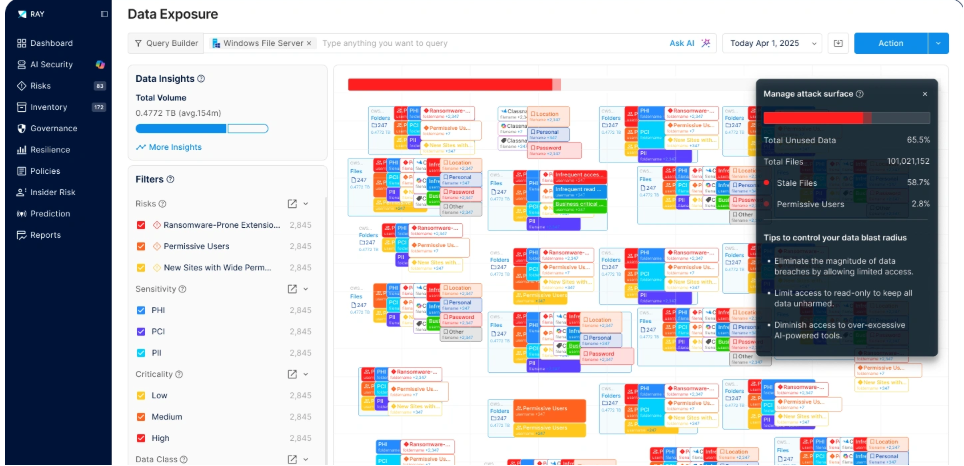
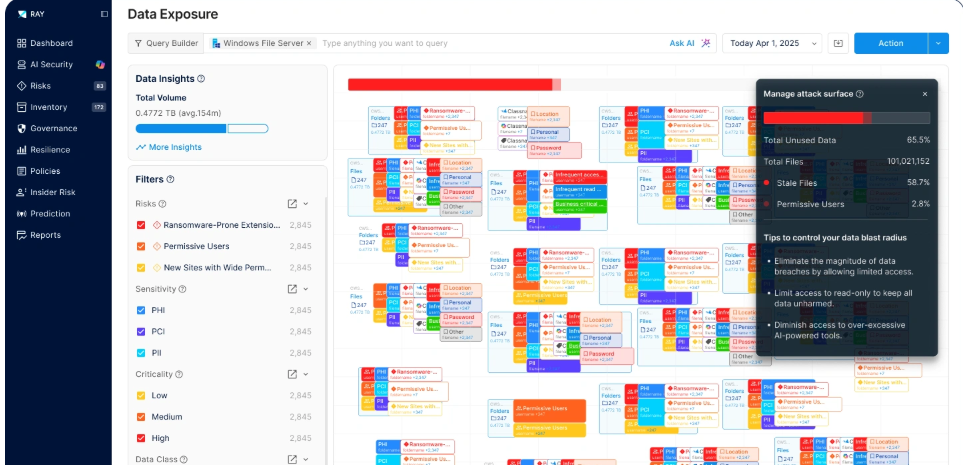
*Figure 1.
Data exposure across a single file server.
The attack surface panel on the right is the argument: most of what is exposed is not in use.
Vendor demonstration environment, not customer data.*
Permission debt, and why it went unpaid
Ray Security's founding observation is that on any given day, the overwhelming majority of enterprise data is not accessed by anyone.
Their published figure is over 90 percent.
Take the exact number as the vendor's rather than ours, but the shape of it will be familiar to anyone who has run a file server.
Most data sits there.
Unused, and fully exposed anyway.
It is exposed because permissions were granted for a reason that expired, and nothing ever revoked them.
Revoking access is a thankless job.
It risks breaking someone's workflow, nobody thanks you when it goes well, and everybody notices when it does not.
So the grants accumulate, year after year, and the gap between what people can reach and what they need widens quietly.
That was a defensible trade for a long time.
The probability that anyone would stumble onto the wrong file was genuinely low, because finding it required knowing it existed.
AI assistants changed the probability, not the permissions.
There is a useful way to think about who consumes that gap.
An over-broad grant is one attack surface with three different consumers.
The insider who goes looking.
The ransomware operator who encrypts everything reachable from a compromised account.
And now the copilot, which reaches all of it in the course of being helpful.
Reduce the surface and all three get smaller at once, which is the argument for treating this as one problem rather than three.
What this looks like once Copilot is running
The pattern shows up immediately in monitoring.
Prompts get counted in the millions.
A meaningful share of them touch files.
And a large fraction of the files touched turn out to be sensitive, because sensitive data is exactly what people ask questions about.
The recurring finding has a name, and it is not subtle: excessive access.
The same issue, over and over, on different users.
The one that tends to get attention in a review is stale access via prompts.
Thousands of sensitive files, reached through an AI assistant, after more than a month of no human touching them at all.
Nobody had opened those files in weeks.
Then a natural language question found them instantly.
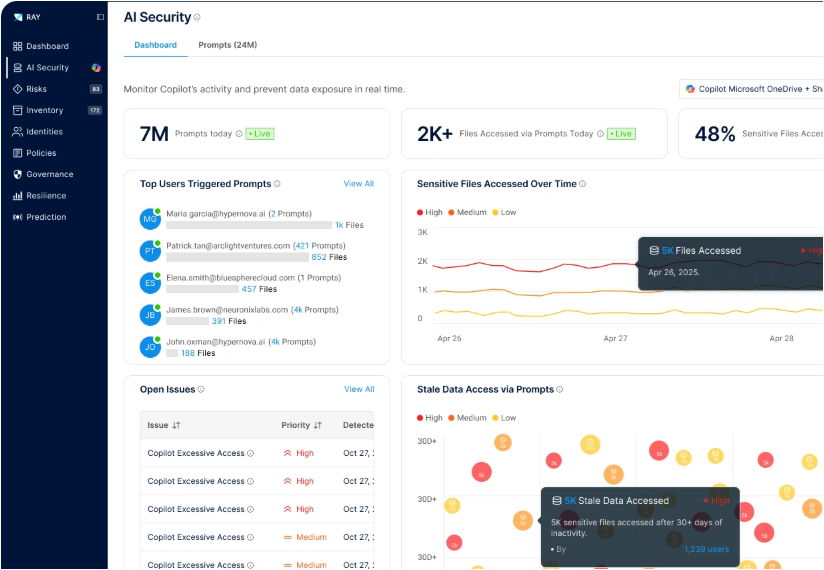
*Figure 2.
Copilot activity monitoring.
The repeated finding is excessive access, and the stale access panel shows sensitive files reached by prompt after 30 or more days of inactivity.
Vendor demonstration environment with fictional tenants.*
None of this is a Copilot defect.
Every one of those accesses was permitted.
That is the point worth sitting with.
Why the obvious fixes do not hold
Three responses come up in most conversations, and each has a real problem.
Classify everything first.
Reasonable in principle, and it is how data security has traditionally been sequenced.
The difficulty is arithmetic.
Full classification of a large estate is a multi year programme, data volume roughly doubles every two years, and the exposure is live now.
Something that only works after the classification project completes is not a control, it is a plan.
Review the permissions.
Also correct in principle.
At the scale of a hundred million files with inherited groups, nested memberships and sharing links, manual review does not converge.
Teams generate enormous issue lists with no clear action attached, and the list ages faster than it gets worked.
Restrict the assistant.
This is the one that feels safest and costs the most.
You bought the assistant for productivity.
Locking it down until the data is clean means paying for it and not getting the benefit, and in practice people route around the restriction.
The common thread is that all three try to manage the exposure rather than remove it.
The move: reduce what is reachable
The alternative is to shrink the reachable surface itself, and the reason it is achievable is the same statistic from earlier.
If most data is not being used, then most access to it is not needed.
That reframes the problem from a classification exercise into a usage question.
Instead of asking what is this file and how sensitive is it, which is expensive and slow, you ask a cheaper question first.
Is anybody actually using this, and does this identity need to reach it.
That question can be answered from observed behaviour, at scale, without waiting for the classification programme to finish.
It also degrades gracefully, which matters more than it sounds.
Even where data is only partially classified, usage patterns still tell you what to tighten.
This is where Ray Security sits, and it is why we brought them into our stack.
How Ray approaches it
Ray describes itself as a predictive data security platform, and the prediction part is the actual differentiator rather than packaging.
Rather than treating all data as equally important, its engine continuously analyses access patterns, data behaviour and business cycles to work out which data will be used.
Protection then gets applied differently.
Data in active use gets real time detection and response.
Dormant data gets locked down hard, on the reasoning that access nobody exercises is access nobody misses.
The platform covers a few connected jobs:
- Full data inventory and mapping. Where data lives across on premises, cloud and SaaS, and critically, who can reach it versus who ever does.
- AI data access control. Governing what AI assistants and agents can see, which is the Copilot problem above.
- Shadow AI data access. Which AI identities and service principals are touching which stores. Worth separating from what AIDR does: the endpoint layer sees which AI tools are running and what flows through them, and the data layer sees which AI is reaching into your data. Different sensor, different question, and you want both answers.
- Permission review and reduction. Access tightened continuously against real usage rather than in an annual audit, so sprawl does not simply regrow.
- Anomaly detection. Unusual access patterns surfaced for investigation.
The question every CISO asks first
Before any of that lands, someone in the room asks the obvious thing.
You want to scan what, exactly.
Ray's answer is a design decision rather than a policy promise, which is the part worth knowing.
The platform runs on metadata by default.
Content classification is opt in rather than on, filenames are tokenized, and where sensitivity is evaluated it stores a flag rather than the content behind it.
That matters for the AI conversation specifically.
A tool brought in to reduce data exposure that itself ingests all your data has an awkward story to tell.
This one is built so that the default posture is to know where things are and who can reach them, without needing to read them.
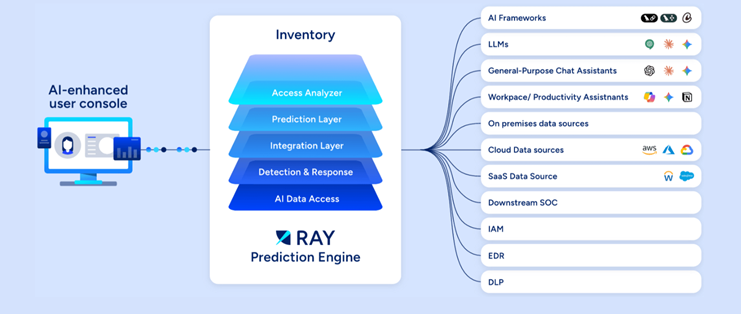
*Figure 3.
The platform sits between the data sources on one side and the AI tools reaching into them on the other, and feeds the SOC, IAM, EDR and DLP stack downstream.*
The architecture point worth noticing is the right hand side of that diagram.
It does not stop at data sources.
It explicitly enumerates AI frameworks, LLMs, general purpose chat assistants and workplace productivity assistants as consumers of data that need governing, which is the correct model for how data actually gets reached now.
What we tell customers, including the unflattering parts
We put this in front of customers, so a few things are worth saying plainly that a datasheet will not.
The headline reduction number is the vendor's, not ours.
Ray publishes data attack surface reduction of up to 90 percent, and in some material as high as 95.
That is their figure, measured their way.
What we would say is that the direction is right and the mechanism is sound, and that your number depends heavily on how messy your estate is to begin with.
Organizations with a decade of accumulated sharing see dramatic reductions, because they had dramatic exposure.
A tightly run estate will see less, and that is a good problem to have.
It is not DLP, and it does not replace it.
This reduces what can be reached.
Data loss prevention stops data leaving through active channels.
Different halves of the problem, and we deploy both.
Permission reduction is a change management exercise, not just a technical one.
Even when the data says an access path is unused, somebody owns that data and will want a say.
The projects that go well are the ones where security agreed the rollback path with data owners before the first tightening, not after.
Usage prediction has a known failure mode, and you should plan for it.
Ranking data by likelihood of near term use works well for the bulk of an estate.
Where it strains is rare but critical access.
Year end audit files, disaster recovery runbooks, the legal hold nobody touches until the day it matters.
Low usage, high consequence.
That is exactly why break glass access with strong verification is part of the design rather than an afterthought, and it is worth testing that path deliberately before you need it.
Start where the exposure is concentrated.
In most environments that is SharePoint and OneDrive, because that is where collaborative sprawl accumulates and it is exactly what Copilot indexes.
Boiling the ocean across every repository at once is how these programmes stall.
The two halves of the AI security problem
It is worth being explicit about how this fits with the rest of what we have written, because these two things get conflated constantly and they fail differently.
Securing the interaction.
Prompt injection, jailbreaks, malicious tool calls, agents doing things they should not.
That is the AI detection and response layer, and we covered it in AIDR explained for CISOs.
Securing the reach.
What data can this identity, and therefore this assistant, actually touch.
That is this post.
Here is why you need both.
A perfect prompt security layer does nothing about a completely legitimate question from a legitimate user that returns a file they should never have been able to open.
No attack occurred.
No policy was violated.
The data still ended up somewhere it should not be.
Equally, perfectly minimised permissions do not stop an agent from being manipulated into misusing the access it legitimately holds.
One reduces the blast radius.
The other governs the behaviour.
Neither substitutes for the other.
Four questions to ask any data security platform
If you are evaluating this category rather than this product, these are the four questions that actually separate the options.
Run them against whatever you already own.
- Retrospective or predictive. Does it only analyse access that already happened, or does it forecast near term use and set policy from that forecast? Reporting on the past is the easier engineering problem and the less useful answer.
- Findings or enforcement. What happens after the report. Does a human receive a ticket, or does the platform change the permission, on a schedule, with a rollback path? This is the single biggest difference in outcome, because ticket queues age faster than they get worked.
- Classify first or protect first. Must classification finish before anything is protected, or can dormant unclassified data be locked down on day one? If the answer is classify first, ask how long that takes and compare it to how long your AI rollout is taking.
- Deployment weight. A connector in days, or an infrastructure project in quarters? Ask specifically about your on premises estate rather than the SaaS demo.
None of these are trick questions, and a good vendor will answer them directly.
Where to start
If Copilot or any AI assistant is live in your environment, or about to be, the sequence we would suggest is fairly boring and works.
- Find out what is actually reachable. Not what the permission model says, but what effective access resolves to once groups, inheritance and sharing links are taken into account.
- Measure usage before you touch anything. The unused fraction is your safe reduction budget.
- Tighten the dormant data first. Lowest operational risk, largest surface reduction, and it buys credibility for the harder conversations later.
- Then look at what the assistants are reaching. Excessive access findings tell you where the remaining risk is concentrated.
- Keep it continuous. Permission sprawl regrows. A one time cleanup decays back within a year.
Talk to us about your data exposure
We deploy Ray Security as part of the data security stack that sits alongside StrongHold MCSS.
The reason that pairing matters is where the intelligence ends up.
When an alert fires on a system, an analyst who can see what sensitive data sits there treats it differently from one who cannot, and a host full of customer records is a different incident from a host with nothing on it.
If you want to know what your AI assistants can currently reach, that is a measurable question with a concrete answer, and it usually takes days rather than months to get it.
Talk to a security expert and we will scope a data exposure assessment against your real environment.
References
- Ray Security, Preemptive Data Security two pager and platform one pager, 2026.
- Ray Security, SharePoint Data Security and Governance, 2026.
- Ray Security white paper, 2026.
- Product screenshots courtesy of Ray Security, captured in a demonstration environment with fictional tenants.
---
Author · Gregori Nazarovsky, CTO, QMasters
Last updated · 2026-08-25
Reading time · 9 min
FAQ
Frequently asked questions.
No. Copilot operates strictly within the permissions of the user running it. The exposure problem is that most organizations have far broader permissions than anyone realizes, and an AI assistant makes that reachable data trivially easy to find.
Data attack surface reduction means cutting the volume of data each identity can reach down to what the business actually needs. It works because most organizational data is not in active use, so access to it can be tightened without disrupting anyone's work.
Data security posture management is about knowing where data lives, who can reach it, and reducing that exposure before anything happens. Data loss prevention is about stopping data leaving through active channels. They solve different halves of the problem and are usually deployed together.
They are two different layers. AI detection and response secures the interaction layer, meaning prompts, agents and tool calls. Data access governance secures what those agents can reach in the first place. Securing the prompt does not help if the identity behind it can reach data it should never have had.
Yes, when the reduction is driven by observed usage rather than guesswork. If a data set has not been touched by anyone in months, tightening access to it carries very little operational risk, which is why usage driven reduction is safer than manual permission projects.
ABOUT THE AUTHOR
Practitioners from the QMasters Security Operations Center. We run 24/7 monitoring, detection engineering, and incident response for organisations across regulated industries — and write here from the offense and defense work in front of us.