
THREAT ADVISORY · 14 MIN
PHP2Shell: What Our CrowdStrike Customers Need to Check Now
PHP2Shell guidance for CrowdStrike customers: patching, Falcon policy and sensor checks, Exposure Management, SIEM coverage and four CQL hunting queries.
What should QMasters CrowdStrike customers check for PHP2Shell?
Patch affected PHP runtimes, confirm Falcon sensors are healthy and not in Reduced Functionality Mode, and enable On Write Script File Visibility for Linux in the applicable prevention policy. Review both PHP2Shell CVEs in Exposure Management and assess container images where Cloud Security Image Assessment is configured. Verify the required web-server logs reach Next-Gen SIEM before interpreting an empty dashboard or correlation rule as reassurance. Additional discovery of custom PHP installations requires Windows sensor 7.40 or later or Linux sensor 7.31 or later; existing package-manager and targeted-application checks still cover supported earlier sensors. Falcon detection coverage does not replace the PHP security update.
Customer guidance · 23 October 2026
If you run CrowdStrike Falcon with QMasters, the question is not simply whether Falcon has coverage for PHP2Shell. It does. The useful questions are: Which systems still need a PHP update? Are the right policies actually applied? And are we collecting the data needed to investigate an attempt?
CrowdStrike’s customer guidance, updated on 22 October, adds important operational detail to the initial disclosure. This post turns that guidance into a practical checklist for our CrowdStrike customers. It complements our PHP2Shell technical advisory; it does not replace the live vendor instructions or claim that checks have already been completed in your environment.
The header and screenshots below show CrowdStrike interfaces supplied for this article, including eight figures extracted from the Customer Center PDF. They illustrate where to look, not the patch status, coverage or incident history of any particular customer. Visible host identifiers have been redacted where appropriate. Product imagery and interface names belong to CrowdStrike. Full-size links beneath the figures let you inspect the original-resolution details.
Start with the patch, not the banner
PHP2Shell covers CVE-2026-109618 and CVE-2026-109619, two critical PHP engine vulnerabilities rated CVSS 4.0 9.2. Affected web-serving deployments can be exposed to unauthenticated remote command execution. This is not a plug-in problem that disappears when you update your CMS.
CrowdStrike’s in-console banner directs customers to the technical alert, response dashboard and exposure assessment. Use those links to begin the review. Do not read the existence of the banner—or Falcon’s detection coverage—as confirmation that the underlying PHP installation is fixed.

Figure 1. The PHP2Shell console notice. Image: CrowdStrike interface, supplied for this article. The notice is a starting point for action, not a completion record.
PHP’s fixed upstream releases are 8.5.12, 8.4.27, 8.3.36 and 8.2.35. Use the appropriate supported security release or a vendor-confirmed backport. For older branches, verify supported vendor remediation or plan migration; do not assume an unsupported runtime is protected because its package manager reports no pending update.
After updating, restart or redeploy the affected workers and confirm the version used by the running web service. Include container images and deployment templates so a later rollout cannot restore a vulnerable runtime.
Exposure Management: look beyond the usual PHP inventory
Open Exposure management → Vulnerability management → Vulnerabilities and review both CVE identifiers. CrowdStrike describes this workflow for Falcon Exposure Management and Falcon Spotlight customers.
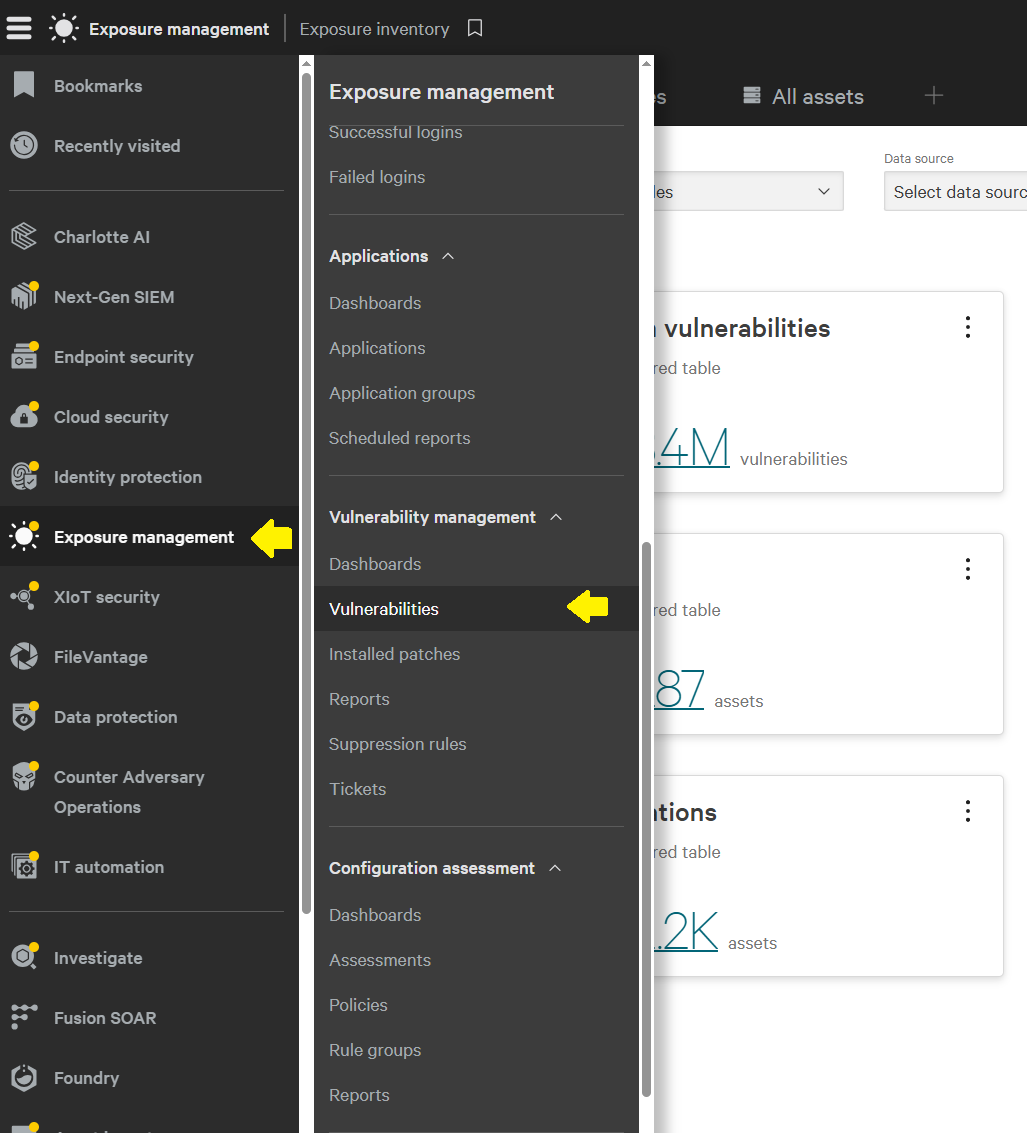
Figure 2. Finding Vulnerability Management. Extracted from page 9 of the supplied CrowdStrike article. The arrows identify the navigation path; background inventory totals are illustrative. Open full-size image.

Figure 3. The two PHP2Shell vulnerability records in the supplied console view. Image: CrowdStrike interface. Counts, filters and exploit-status labels reflect that captured view; they do not establish compromise or a complete asset inventory. Open full-size image.
Do not stop at the package-manager list. Custom binaries, application-bundled runtimes and installations outside standard paths can require additional discovery.
| Discovery capability | Sensor requirement in the supplied guidance | What it adds |
|---|---|---|
| Existing package-manager and targeted-application checks | All supported sensor versions; no new minimum for these checks | Existing assessment of known packages and targeted applications |
| Additional Windows executable discovery | Falcon sensor 7.40 or later | A system-wide check for PHP executables on the default drive |
| Additional Linux process discovery | Falcon sensor 7.31 or later | Identification of PHP installations through running processes outside expected package-management paths |
An earlier supported sensor is not automatically without coverage. It retains the existing checks, but not these additional discovery methods. Equally, an additional running-process check should not be treated as a guarantee that every dormant PHP copy has been inventoried.
Use your normal sensor-upgrade policy and service-owner review. The objective is a defensible inventory, not a version number checked off without understanding the difference.
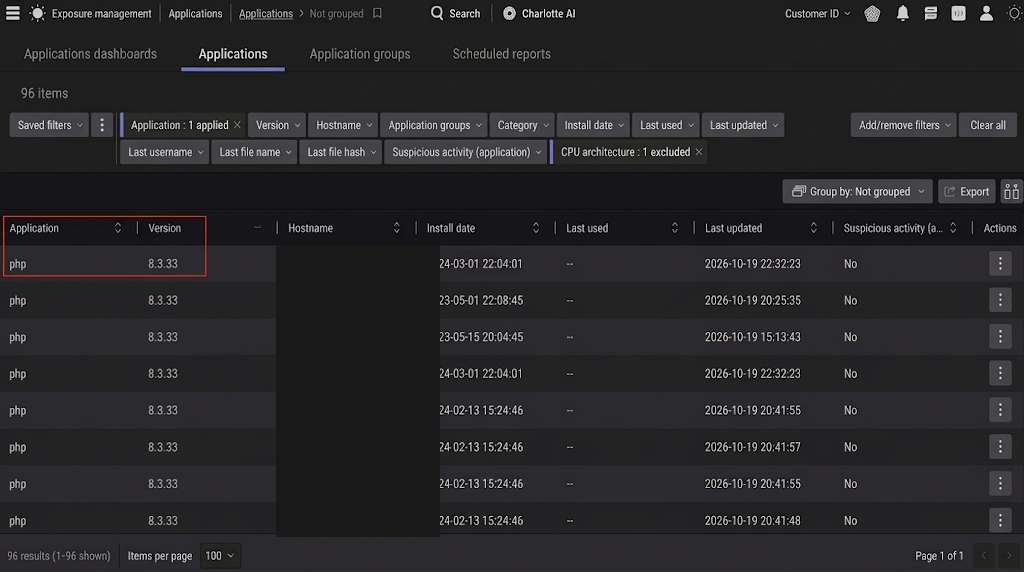
Figure 4. PHP application inventory in the vendor example, extracted from page 10. Host identifiers are redacted. The displayed PHP 8.3.33 entries illustrate discovery, not a fixed release: the advisory identifies 8.3.36 as the upstream fix for that branch. Open full-size image.
Network scans and external assets
For network assessment, go to Exposure Management → Setup → Network Vulnerability Scans, create an appropriate scan template, select the relevant checks and assess authorized targets.
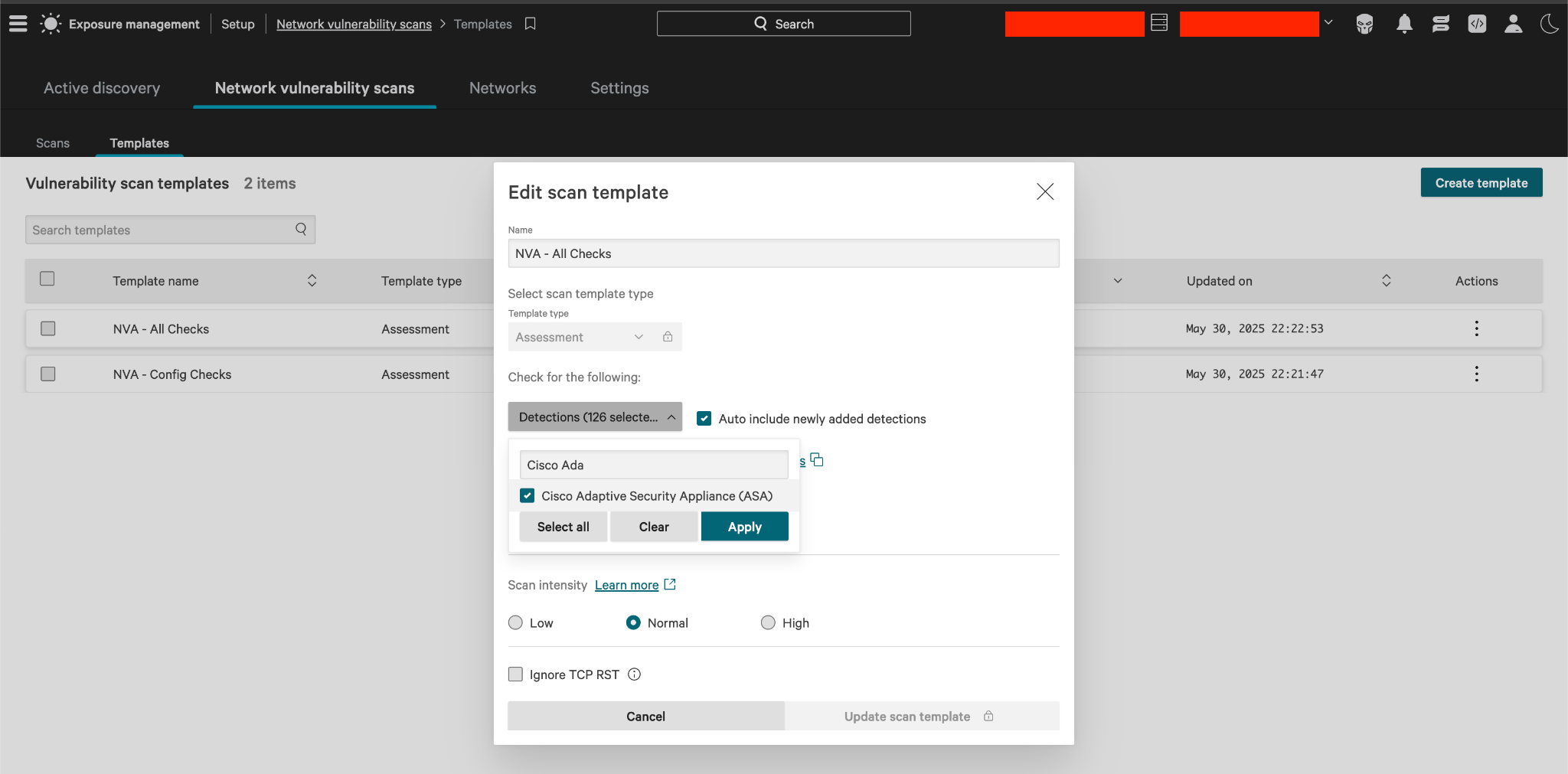
Figure 5. Scan-template setup, extracted from page 11 of the CrowdStrike article. This is a generic workflow illustration: the visible selection concerns another product, not a ready-made PHP2Shell scan configuration. Select the relevant PHP checks for your assessment. Open full-size image.
For external exposure, go to Exposure Management → Asset → External assets and filter the application name to php. Review internet-facing findings alongside your internal inventory.
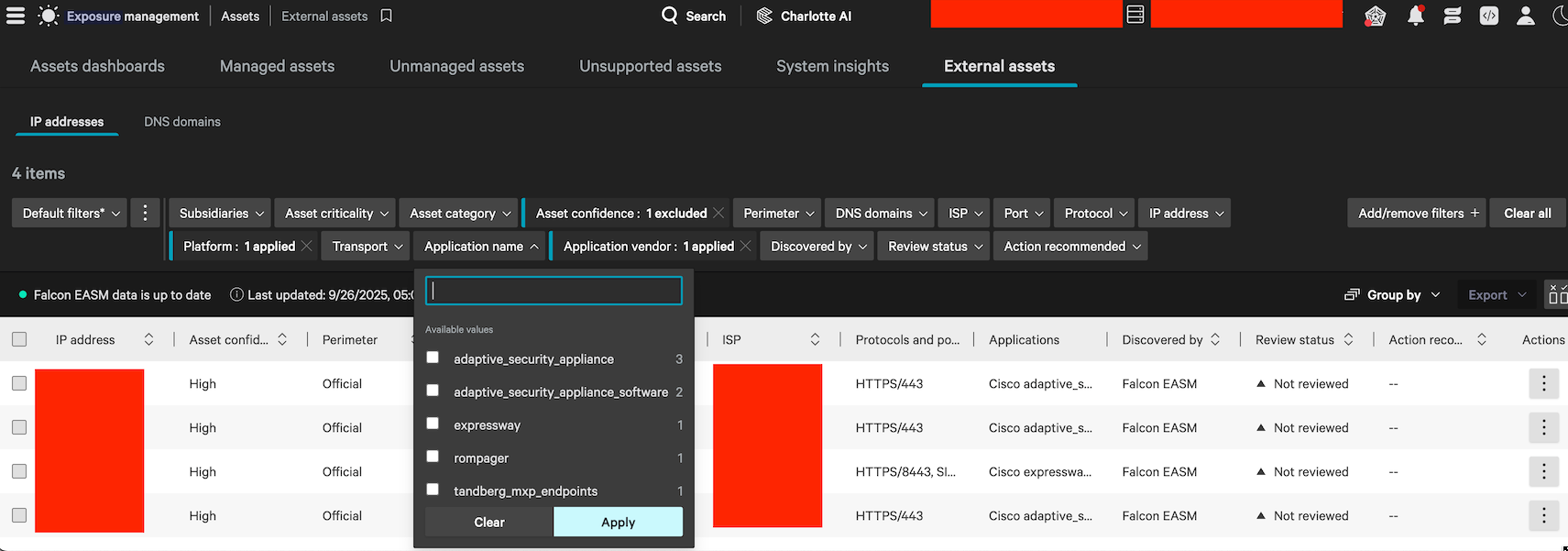
Figure 6. EASM application filtering, extracted from page 11. The source’s redactions are retained. This older generic screen shows other application names; use the same workflow to select php rather than copying those example filter values. Open full-size image.
External discovery and banner information help prioritize reachable assets. They do not replace checking the actual runtime, vendor backport status and effective configuration.
Next-Gen SIEM: an empty widget is not a clean bill of health
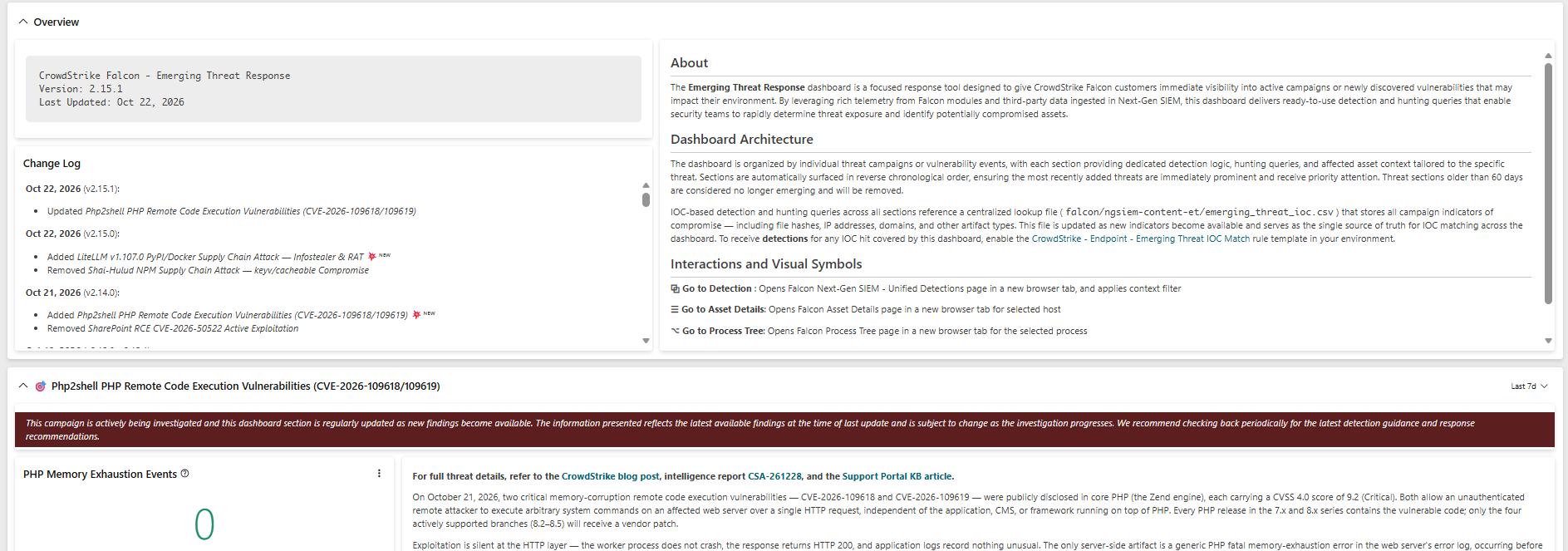
The CrowdStrike Falcon - Emerging Threat Response dashboard includes a PHP2Shell section for both CVEs. Find it under Next-Gen SIEM → Log management → Dashboards.
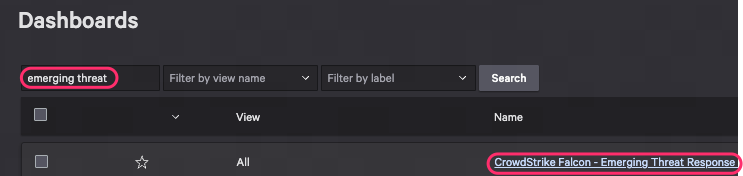
Figure 7. Locating the Emerging Threat Response dashboard, extracted from page 5 of the supplied CrowdStrike article. Open full-size image.
The supplied dashboard screenshot is the header image for this article. It shows why context matters: a zero in a widget describes the selected query, sources, filters and time range. It is not an assurance that every relevant server is patched or that exploitation has been ruled out.
CrowdStrike’s customer article makes the ingestion prerequisites explicit:
| Falcon content | Third-party logs required for the relevant coverage |
|---|---|
| PHP2Shell Emerging Threat Response dashboard widgets | Apache, IIS, F5 NGINX or Microsoft Azure |
| PHP startup-memory-exhaustion correlation rule template | Apache, F5 NGINX or Microsoft Azure |
Do not silently carry IIS from the dashboard list into the correlation-rule prerequisites. The supplied guidance lists different sources for the two.
Before interpreting results, check that the correct logs arrive, timestamps are usable, parsing exposes the expected fields, and the dashboard covers the right hosts and investigation period.
The correlation rule to review
CrowdStrike identifies this template:
Generic - Web - PHP Memory Exhaustion During Request Startup (CVE-2026-109618 & CVE-2026-109619)
It targets the combination of a PHP memory-exhaustion message and the startup marker in Unknown on line 0. This distinguishes the signal from ordinary errors tied to a running script.
Treat a match as an investigation lead. Correlate it with the affected host, process tree and surrounding activity before deciding whether it represents exploitation. A missing match is not proof of safety, especially when source ingestion is incomplete.
Verify that the template is available in your Falcon region and that its intended alerting workflow is configured. Finding a template is not the same as confirming that a detection is operational.
Container images need their own review
For Falcon Cloud Security customers, open Cloud Security → Vulnerabilities → Image Assessment and check for both CVEs.
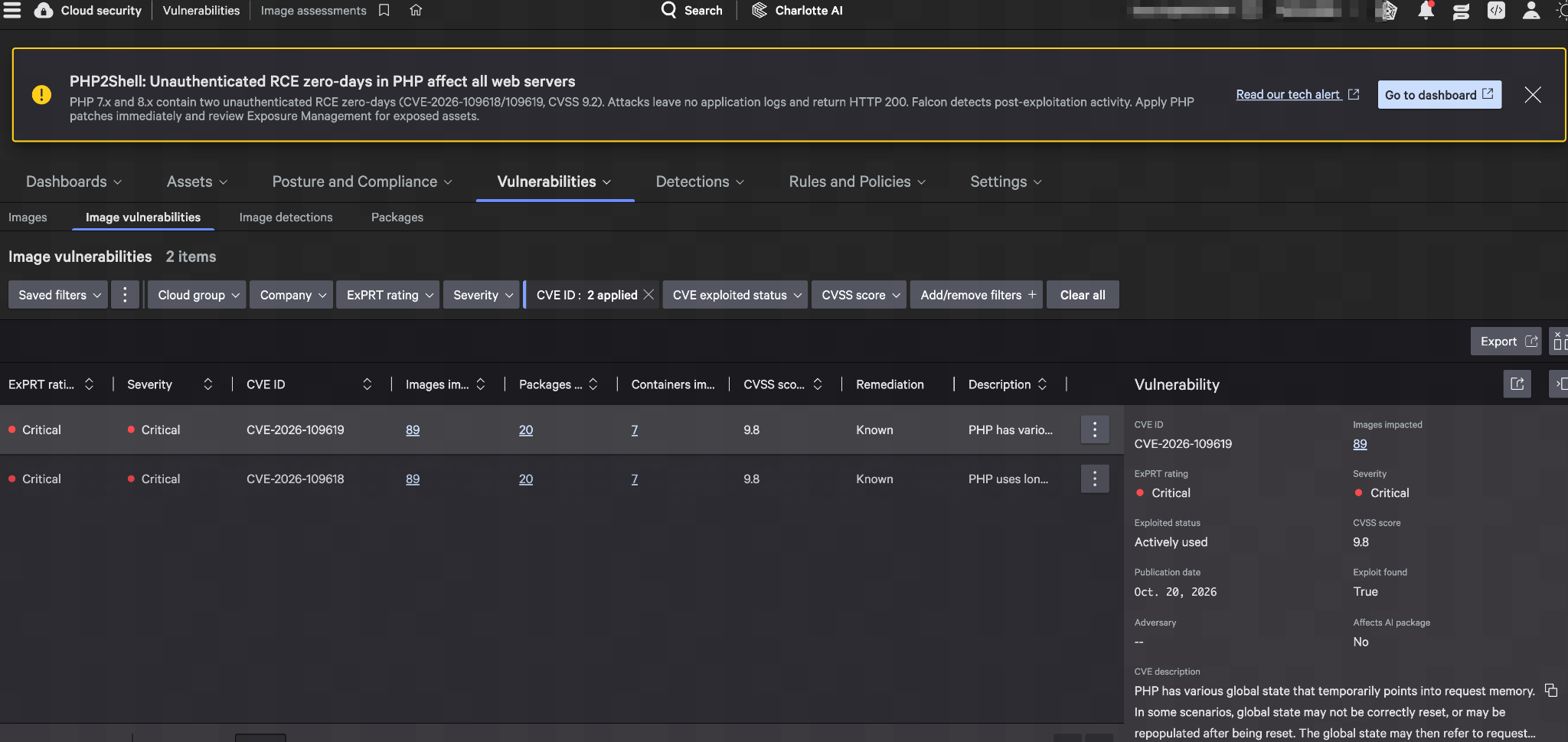
Figure 8. Image Assessment findings, extracted from page 8. Image, package and container counts are the vendor example’s values, not our customers’ inventory. The captured console uses its displayed scoring fields; the advisory’s CVSS 4.0 score is 9.2. Open full-size image.
Image Assessment must already be configured for the findings to appear. CrowdStrike says no additional or special PHP2Shell configuration is required beyond that prerequisite.
A host finding and an image finding are not interchangeable. Identify the affected image, its deployed workloads, the corrected base image or package, and the deployment that removes the old build. Confirm the replacement is running rather than only rescanning an image that never reached production.
What Falcon coverage means
CrowdStrike describes behavioral coverage for post-exploitation activity, including suspicious child processes of PHP or web-server processes, malicious command execution and web-shell deployment.
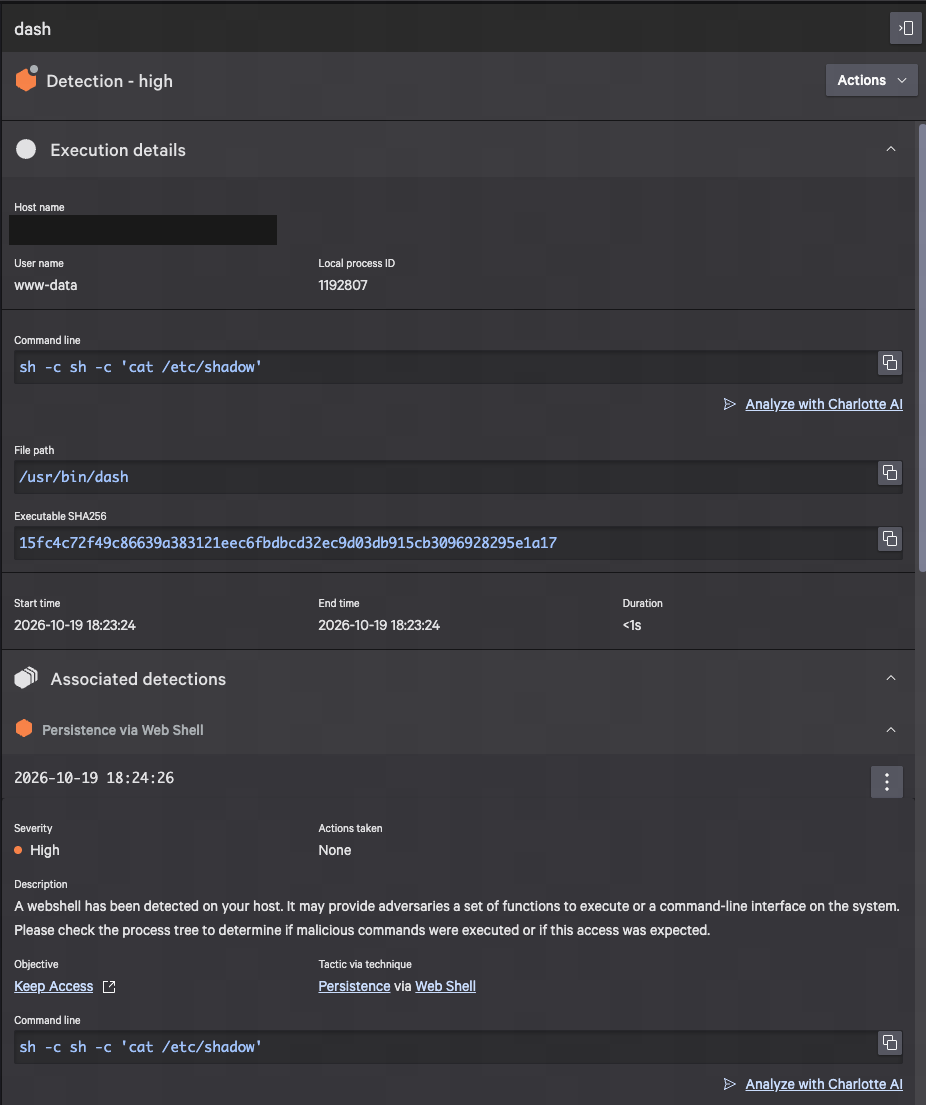
Figure 9. The Linux post-exploitation detection example from page 7. Host identity is redacted. This is CrowdStrike’s example, not an incident from a QMasters customer. The displayed action is None: this screenshot illustrates detection and must not be described as proof that the activity was blocked. Open full-size image.
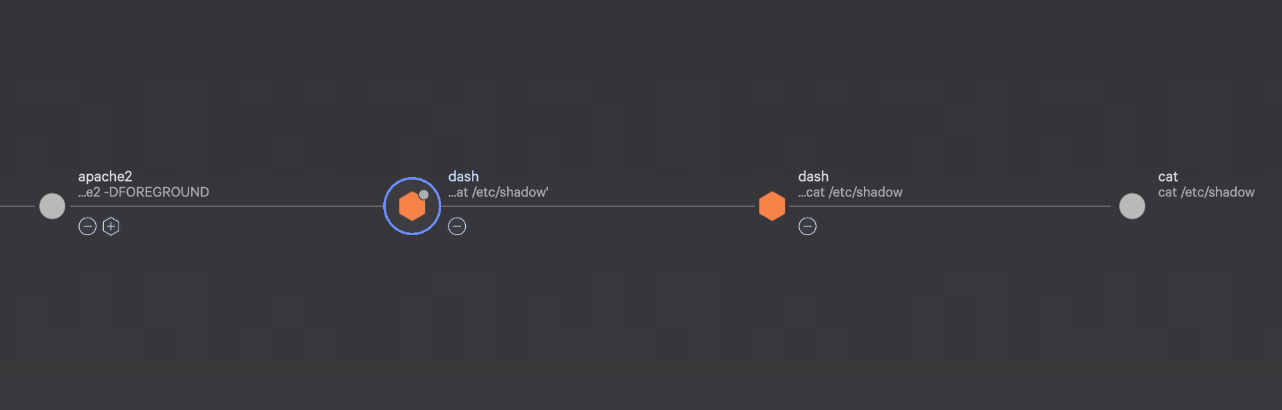
Figure 10. The related Apache process-tree example from page 7, showing why process ancestry matters when investigating suspicious web-server activity. Image: CrowdStrike. The command is presented as detection evidence, not an instruction to execute. Open full-size image.
Keep the responsibilities clear: Falcon supplies detection and prevention capabilities; analysts investigate the signal and decide the response; the service owner applies and verifies the PHP fix. Coverage is not a guarantee that every attack is stopped, and a patch does not remove persistence or recover credentials already exposed.
If activity is suspicious, follow the incident process: preserve evidence, assess scope and contain through authorized procedures. Do not close an incident solely because the runtime has now been updated.
CrowdStrike hunting queries you can run
The following are QMasters-authored, read-only CrowdStrike Query Language (CQL) hunting examples for Next-Gen SIEM → Advanced Event Search, or a Falcon LogScale view containing the stated data. They are not CrowdStrike’s managed PHP2Shell correlation rule, not exploit code and not commands for Real Time Response.
Start with a 24-hour time range in the console. Extend to the relevant exposure period within your retention limits, and narrow to the affected hosts as your investigation progresses. Queries 1–3 require Linux Falcon process telemetry; query 4 requires ingested web-server error logs. Choose the corresponding repository or view before running each query.
These examples use documented CQL filters and table syntax. They have not been executed against your Falcon tenant. Confirm the available event schema and investigate matches before turning a hunt into an alert. Each table returns at most 200 recent rows; that is a display cap, not a count of all matching events.
Query 1: find observed PHP and web-server process executions
Use this as a starting point for identifying hosts with recorded PHP, Apache or NGINX executions:
#event_simpleName=ProcessRollup2 event_platform=Lin
| ImageFileName=/(^|\/)(php(?:-fpm|-cgi)?[0-9.-]*|httpd|apache2|nginx)$/i
| table(["@timestamp", "aid", "ComputerName", "UserName", "ImageFileName", "CommandLine", "TargetProcessId"], sortby="@timestamp", order=desc, limit=200)
Interpretation: these are process-start observations, not a complete software inventory, running-process snapshot or vulnerability assessment. A long-running worker may have started before the selected window; dormant binaries will not appear. Use Exposure Management and vendor package evidence to establish the PHP version and patch status. Unusual binary names or paths may require expanding the filter.
Query 2: investigate shells launched directly by a web-serving process
This looks for a shell whose recorded immediate parent is Apache, NGINX or PHP:
#event_simpleName=ProcessRollup2 event_platform=Lin
| ParentBaseFileName=/^(apache2|httpd|nginx|php(?:-fpm|-cgi)?[0-9.-]*)$/i
| ImageFileName=/(^|\/)(sh|bash|dash|ash|ksh|zsh|busybox)$/i
| table(["@timestamp", "aid", "ComputerName", "UserName", "ParentBaseFileName", "ImageFileName", "CommandLine", "TargetProcessId"], sortby="@timestamp", order=desc, limit=200)
Interpretation: a web server spawning a shell deserves review, but legitimate application jobs can do this too. Check the full command line, account, deployment history and process tree. This query covers the immediate parent only; an intermediate launcher or a different runtime name can evade the filter.
Field prerequisite: confirm that ParentBaseFileName is populated in your selected telemetry view. Some exported or differently enriched datasets omit parent names or ComputerName. Use aid to resolve the host and inspect process ancestry in Falcon; an empty parent field is not evidence that no suspicious child process ran.
Query 3: look for sensitive-file references in process command lines
The vendor example shows a process targeting a credential file. This broader hunt looks for references to Linux password-hash files or the current process’s environment:
#event_simpleName=ProcessRollup2 event_platform=Lin
| CommandLine=/\/etc\/(shadow|gshadow)(\s|$|["'])|\/proc\/self\/environ/i
| table(["@timestamp", "aid", "ComputerName", "UserName", "ParentBaseFileName", "ImageFileName", "CommandLine", "TargetProcessId"], sortby="@timestamp", order=desc, limit=200)
Interpretation: review the ancestry of every relevant match, especially under a web-service account. Backup, compliance and administrative tools can generate legitimate matches. A command-line reference does not prove that the file was read successfully or that PHP2Shell caused the activity. File access performed inside an existing process without these command-line strings will not be found by this query.
Query 4: hunt the startup-phase PHP memory-exhaustion marker
Select the view containing the relevant Apache, F5 NGINX or Microsoft Azure error logs. This parser-independent starting point searches the retained raw message:
@rawstring=/Allowed memory size of [0-9]+ bytes exhausted/i
| @rawstring=/in Unknown on line 0/i
| table(["@timestamp", "#type", "@rawstring"], sortby="@timestamp", order=desc, limit=200)
Interpretation: both markers must occur in the same ingested event. This hunt does not query an endpoint sensor directly and will return nothing if the relevant errors are not ingested, are split across events or are not retained in @rawstring. If your parser normalizes the text into another field, adapt the search to that verified field.
A match is a startup-failure investigation lead, not proof of exploitation. Correlate its timestamp and source host with endpoint process evidence. This is a raw-message hunt inspired by the advisory’s marker; it is not a reproduction or replacement of CrowdStrike’s managed correlation rule, and it does not cover every PHP2Shell attack path.
How to use the results
Preserve the host identifier, event time and process identifiers for relevant matches, then pivot into the process tree and surrounding telemetry. Check expected application behavior before deciding on containment. A query with zero results is meaningful only after source availability, retention, field coverage, filters and time range are verified—and even then it does not establish that an asset is patched.
Syntax references: CrowdStrike’s ProcessRollup2 CQL example, CQL table function and raw-field regular-expression filtering.
The customer completion checklist
- Runtime: affected services identified; vendor fix applied; workers restarted or workloads redeployed; running build verified.
- Sensor: healthy, reporting and not in RFM.
- Policy: applicable prevention-policy best practices reviewed; Linux On Write Script File Visibility enabled and applied.
- Discovery: both CVEs reviewed; custom PHP installations considered; additional-check sensor requirements understood.
- External exposure: relevant network-scan and EASM findings reviewed against the asset inventory.
- SIEM: required source ingestion verified; dashboard and correlation-rule prerequisites checked separately; alert handling confirmed.
- Containers: Image Assessment configured where applicable; affected deployed images replaced and verified.
- Ownership: outstanding exceptions, evidence gaps and follow-up dates assigned to an accountable owner.
For our CrowdStrike customers, this is the standard to work toward: a verified patch, healthy telemetry and a response path that someone owns. Not simply a green screen.
For background, return to QMasters, review our managed detection and response service, or see the CrowdStrike partnership. Keep the technical PHP2Shell advisory alongside this customer checklist.
Source and review date
This article is based on the supplied CrowdStrike Customer Center article Trending Threats & Vulnerabilities: Php2shell PHP Remote Code Execution Vulnerabilities (CVE-2026-109618 & CVE-2026-109619), including its 22 October 2026 updates, the three supplied console screenshots and eight screenshots extracted from the article’s PDF. Captions identify the source pages and distinguish historical or generic workflow examples from current PHP2Shell guidance.
CrowdStrike customers can sign in to the Customer Center and search that title for the current article, region-specific console links, RFM instructions and policy guidance. Customer Center and Falcon resources may require authentication and the relevant subscription.
Public references: CrowdStrike’s PHP2Shell research and PHP’s official security advisory.
Reviewed 23 October 2026. This is a point-in-time customer guide. CrowdStrike’s findings and product capabilities remain attributed to CrowdStrike; the explanation and operational checklist are QMasters’ editorial guidance. No customer-specific exposure or completed remediation is asserted.
FAQ
Frequently asked questions.
No. Falcon provides visibility and behavioral coverage, while the PHP security update fixes the underlying engine vulnerabilities. Patch the actual web-serving runtime, restart or redeploy affected workers, and verify that the running service uses the fixed build. A successful package installation alone is not sufficient evidence.
CrowdStrike specifically recommends enabling On Write Script File Visibility for Linux and following prevention-policy best practices. Its customer guidance says Enhance PHP visibility and PHP script optimization are not required for PHP2Shell exploit detection and prevention coverage in this instance. Confirm the correct policy is assigned and applied, and that the sensor is not in Reduced Functionality Mode.
The relevant dashboard widgets require third-party Apache, IIS, F5 NGINX or Microsoft Azure logs. The correlation rule template specifically requires Apache, F5 NGINX or Microsoft Azure logs. Missing ingestion, incorrect parsing, filters or a time-range mismatch can produce an empty result. Zero results are not proof that a host is patched or uncompromised.
No. Existing package-manager and targeted-application checks cover all supported sensor versions without a new minimum for these checks. Additional discovery requires Windows sensor 7.40 or later for a default-drive executable check, or Linux sensor 7.31 or later for a running-process check. Those additional checks help identify PHP installed outside normal package-management paths.
Cloud Security customers should review Vulnerabilities then Image Assessment, with Image Assessment already configured for findings to appear. No special PHP2Shell configuration is required beyond that prerequisite. Falcon Intelligence subscribers can also review report CSA-261228 through Counter Adversary Operations in their own Falcon region.
ABOUT THE AUTHOR
Practitioners from the QMasters Security Operations Center. We run 24/7 monitoring, detection engineering, and incident response for organisations across regulated industries — and write here from the offense and defense work in front of us.