Back to all four CTI options

Premium CTI

Premium CTI: see what attackers see.

Premium CTI includes everything in Advanced CTI, then adds specialist sources and validation of what is actually exploitable, operated by the QMasters CTI team as an extension of your security function.

2
Intelligence engines
~18
IOC enrichment sources
200K+
Example blocklist, 20+ feeds
6
Step CVE lifecycle

Why Premium CTI

A feed tells you what's bad. Premium tells you what's exposed.

A feed gives you indicators

Volume, no context, and someone on your side to triage it.

A console gives you a login

Powerful, and yet another tool to staff and learn.

Premium CTI gives you an analyst

Evidence, a verdict, and a recommended action, operated by the QMasters CTI team.

Six capabilities

What Premium CTI covers.

  1. 01Continuous clear- and dark-web monitoring: code, paste, Telegram, Tor forums, ransomware feeds.
  2. 02On-demand IOC enrichment of any indicator across about 18 sources.
  3. 03Leaked-credential and identity exposure tied to your organization.
  4. 04External attack-surface mapping: domains, hosts, services.
  5. 05Analyst-reviewed relevance: AI classifies, humans confirm.
  6. 06Validated exposure and selected testing on authorized scope.

Coverage, sources, and integrations are confirmed in the agreed scope of work.

Two engines, shown

The real console. The real workflow.

Reactive

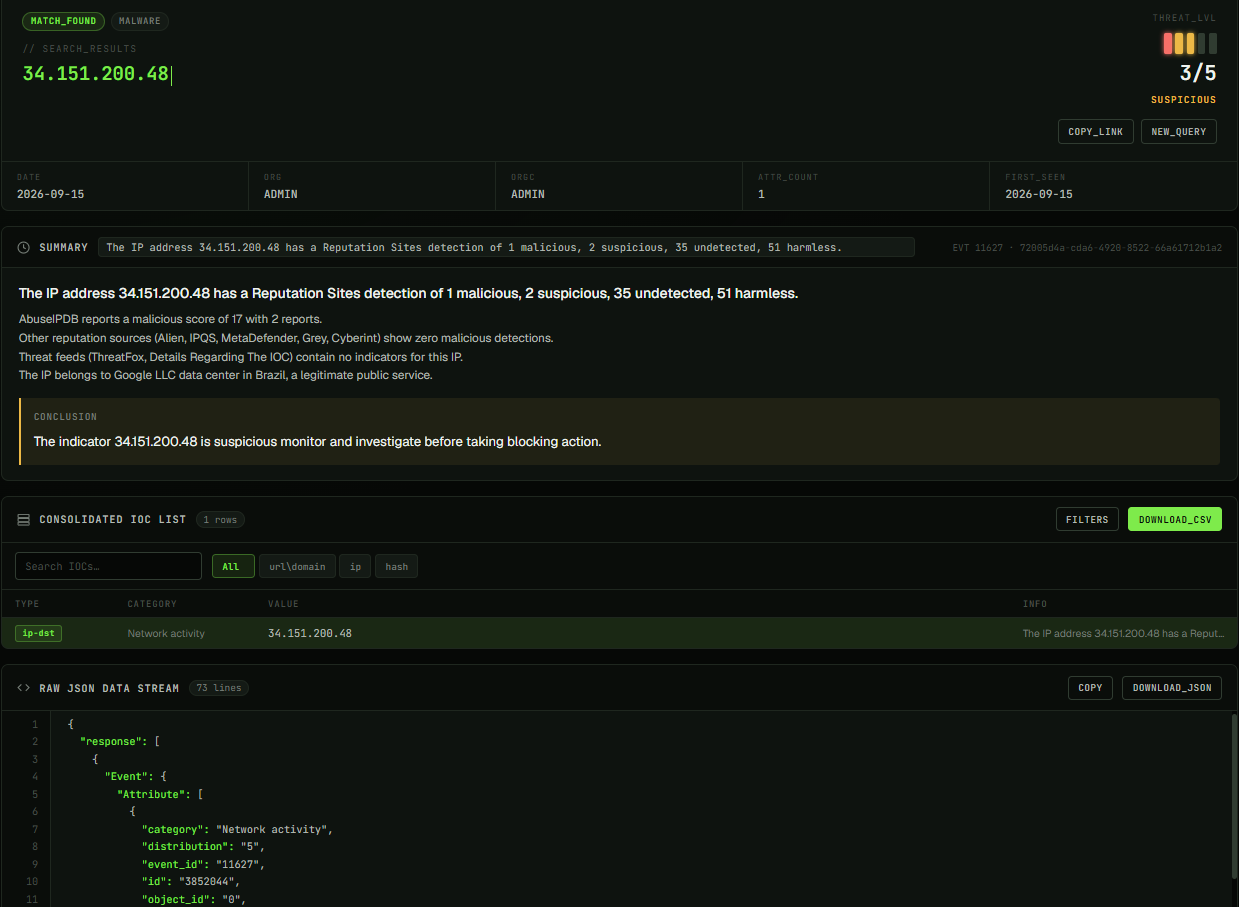
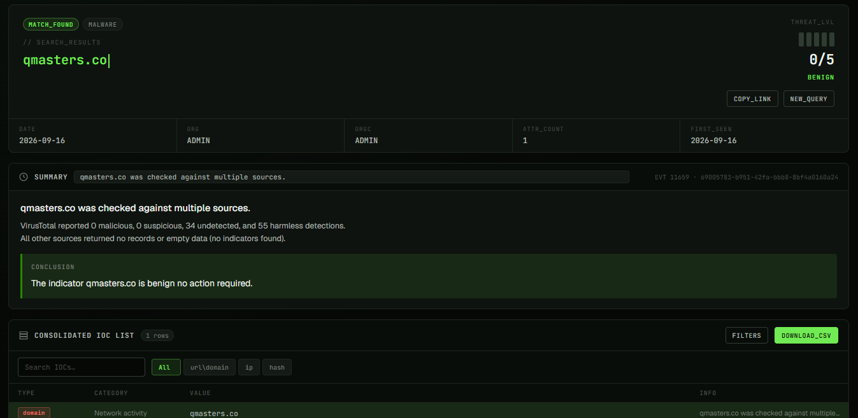
An analyst looks up an IP, domain, URL, or hash against the QMasters MISP feed. The enrichment pipeline aggregates applicable external sources, produces a contextual verdict, and writes a new MISP event back automatically.

Proactive

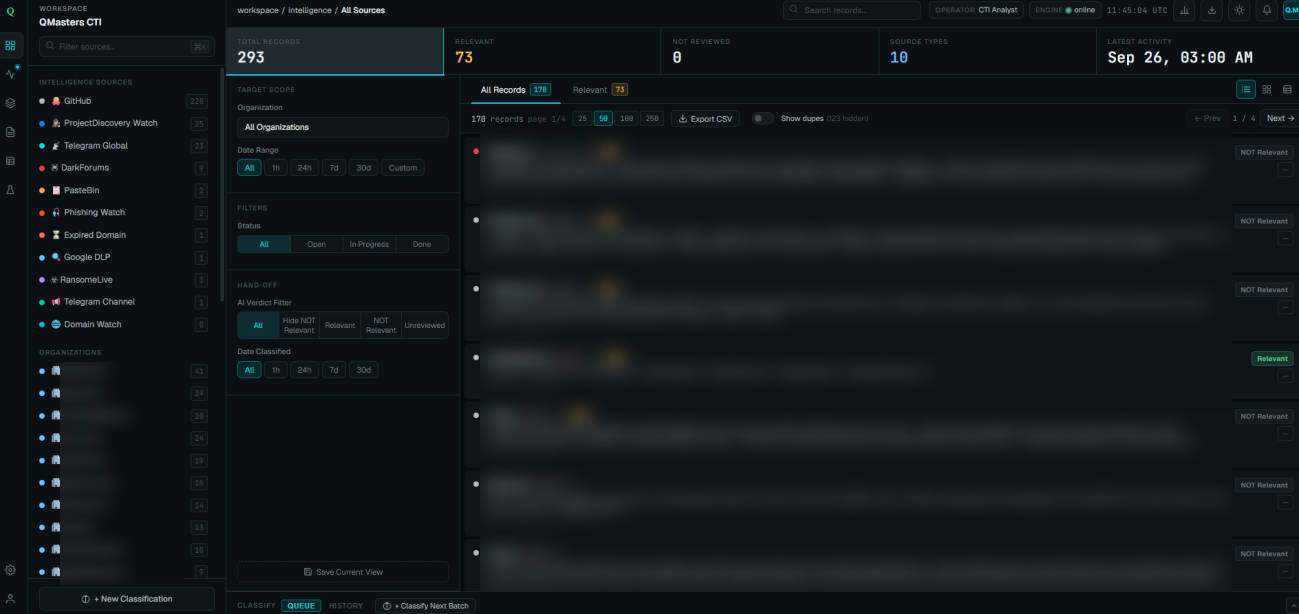
The platform continuously watches your exposure across code, paste sites, the dark web, and Telegram, and analysts review what is relevant to you.

Production screenshots, redacted. Open any image at full size to read the detail.

Redacted production CTI workspace with monitored records and AI relevance decisions for analyst review.
Continuous monitoring: collected records, AI relevance decisions, and analyst review.View original image (opens in a new tab)

Reactive: an IOC lookup, two outcomes

IOC lookup with a 3/5 threat-level score and a suspicious verdict recommending monitoring and investigation before blocking.
Suspicious indicator, threat level 3/5: investigate before taking blocking action.View original image (opens in a new tab)
IOC lookup with a 0/5 threat-level score and a benign verdict.
Benign indicator, threat level 0/5: a clear result helps analysts focus on relevant risks.View original image (opens in a new tab)

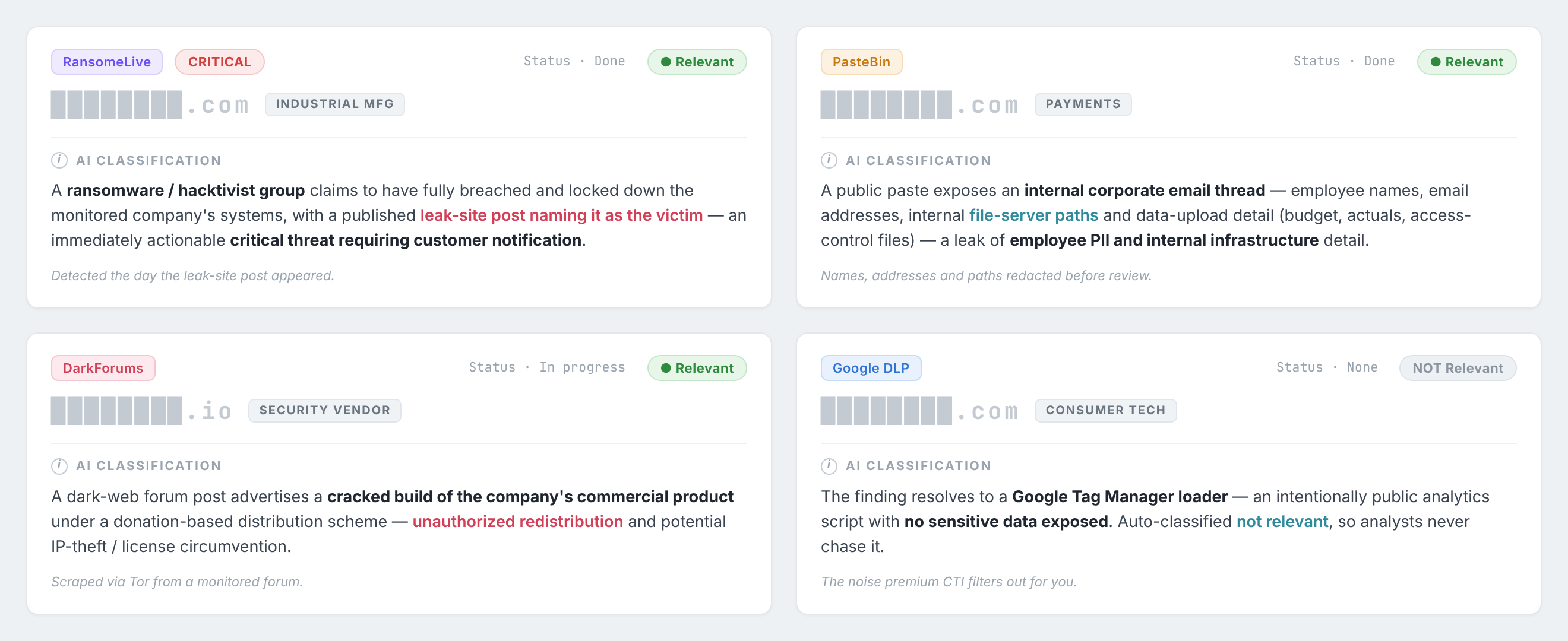
Proactive: what is relevant to you

Four AI relevance decisions: a ransomware claim, an internal-email paste, cracked-product redistribution, and a harmless Google Tag Manager mention filtered out.
Four relevance decisions: ransomware claim, internal-email exposure, unauthorized product redistribution, and a harmless Google Tag Manager record filtered out.View original image (opens in a new tab)

Evidence from the field

What this surfaced in practice.

Financial clearing house

External assessment, authorized

  • 25 exposed hosts mapped from the outside.
  • Video-surveillance, FortiVPN, managed-file-transfer and OPSWAT administrative portals were reachable from the internet; the MFA portal lacked lockout.
  • A payment site meant for a private network was exposed publicly.
  • Version-matched vulnerabilities included GoAnywhere CVE-2024-0204 and Umbraco CVE-2025-24012 / CVE-2025-24011, alongside SQL injection on a public endpoint. A version match alone is not proven exploitation.

Anonymized, selected engagement.
Top-tier law firm

External assessment, authorized

  • Admin service-desk access, with high-privilege command execution.
  • MiCollab 9.3 path traversal and seven CVEs, including CVE-2024-41713.
  • An unhardened WordPress estate: exposed xmlrpc, directory traversal, author/username disclosure, and outdated Wordfence.
  • Reputation scoring of firewall-denied IPs: 18,701 scanned, 7,988 above 50% and 12,426 above 10% malicious confidence; 151 usernames seen.

Reputation is a signal, not proof of compromise.

Fintech, payments and public WordPress estate

Lightweight, non-intrusive lookups

  • Unsupported PHP and SquirrelMail 1.4.21.
  • A public configuration-test file.
  • Username disclosure via sitemap and wp-json.
  • Upload-directory traversal, xmlrpc, and an outdated Wordfence.

CVE and version matches are not proof of compromise.

SIEM discovery over 3 days, clearing house

Indicator-linked events, 3 days
Metric%n
Firewall DENY events tied to known-bad indicators77.6%8,365 / 10,776
Access DENIED events tied to known-bad indicators65.3%1,470 / 2,251
Firewall PERMIT events tied to known-bad indicators52.9%1,768 / 3,345
Login failures traced to malicious IPs-17 / 101

Traffic tied to a malicious indicator is a signal to investigate, not confirmed compromise.

Separate additional findings, not discovered via the SIEM

  • Deep-web credential recovery.
  • 87 enumerable public accounts.

Delivered example: a validated IOC blocklist of 200K+ indicators from 20+ feeds, synced every 3 hours. Cadence and size are set in your scope, not a universal guarantee.

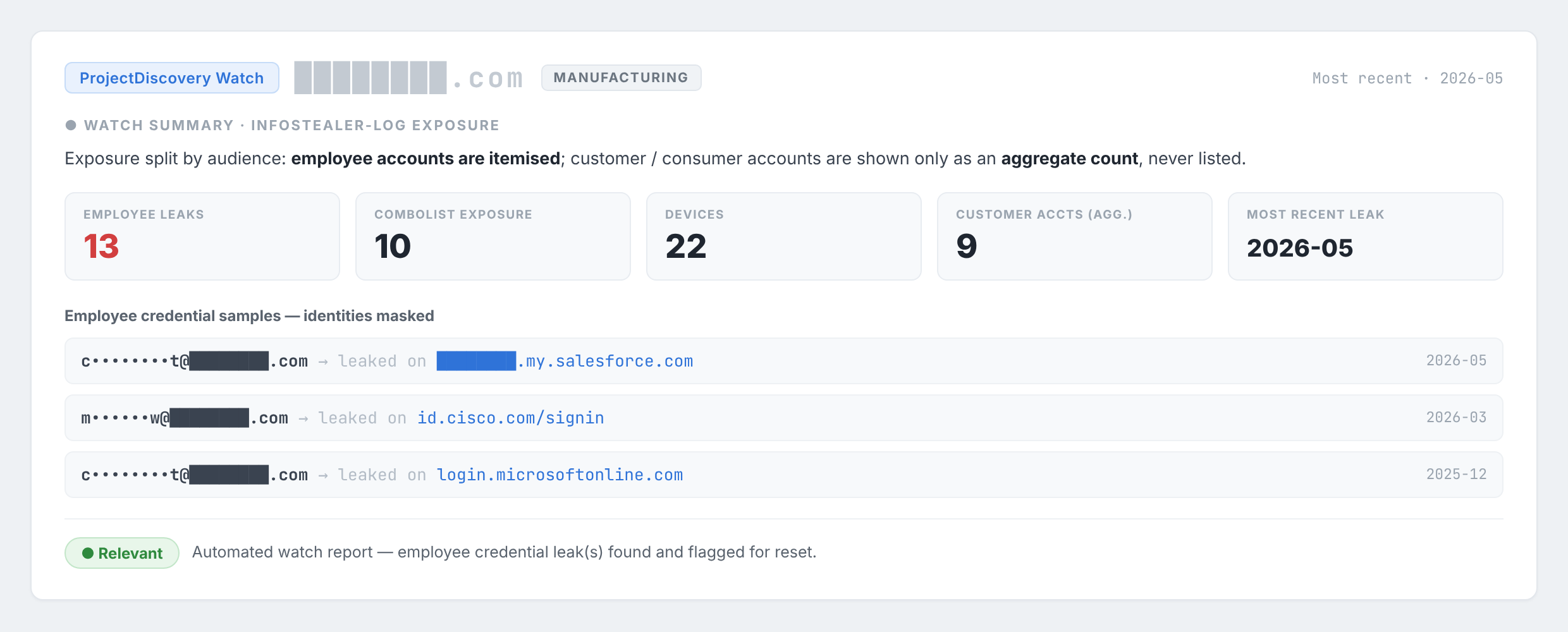
Leaked employee logins, before they're used.

Masked employee credential samples and exposure totals: 13 employee leaks, 10 combolist exposures, 22 devices, and 9 customer accounts shown only as an aggregate.
13 employee leaks, 10 combolist exposures, 22 devices, 9 customer accounts. Employee samples are masked; customer accounts are aggregate-only.View original image (opens in a new tab)

Anonymized report from the presentation. Exposed employee accounts are linked to the SaaS services they unlock; customer accounts are reported only as an aggregate.

Anonymized examples from selected engagements. Not guarantees for every environment.

Lifecycle and vendors

Six steps. Vendors included.

  1. 01

    Discover

    A new CVE, CISA KEV entry, or advisory enters our watch.

  2. 02

    Match

    Correlate to your external assets, versions, and exposure.

  3. 03

    Prioritize

    Exploit intelligence: KEV status, EPSS score, active chatter.

  4. 04

    Validate

    Confirm exploitability under agreed rules of engagement.

    04–06 *

  5. 05

    Remediate

    Prioritized, specific fix guidance for your team.

  6. 06

    Retest

    Re-check the fix and close the loop.

* Steps 04–06 run only on authorized targets, within agreed windows and under written rules of engagement.

A version match is not proven exploitation. Matching a CVE to your external assets raises a question; validation, where authorized, answers it.

Examples include Cyberint, Kaspersky, and Fortinet. One vendor is included; extras are agreed in scope. Vendor access and licensing are confirmed during scoping.

Technical detail: IOC enrichment source inventory

Each indicator is routed to the sources that suit it: file hash, IP address, or domain. Some sources are shared across types, and not every source answers every query. Coverage is not guaranteed for every indicator.

File hash
VirusTotal · AlienVault OTX · Pulsedive · CrowdStrike · MalwareBazaar · Hybrid Analysis · MetaDefender
IP address
AbuseIPDB · VirusTotal · OTX · IPQualityScore · ThreatFox · GreyNoise · MetaDefender · geo/VPN context
Domain / URL
Netskope · URLhaus · VirusTotal · OTX · IPQS · NeutrinoAPI · MetaDefender · ThreatFox · MXToolbox
Shared
MISP / INCD event search · Cyberint · AI aggregation · automatically generated MISP event

Deliverables

What lands on your desk.

  • Feeds

    Validated intelligence into your SIEM and firewalls.

  • Prioritized exposure

    Findings ranked by relevance to your assets.

  • Analyst-reviewed alerts

    Each with evidence and recommended actions.

  • Validation

    Exploitability confirmed within written scope.

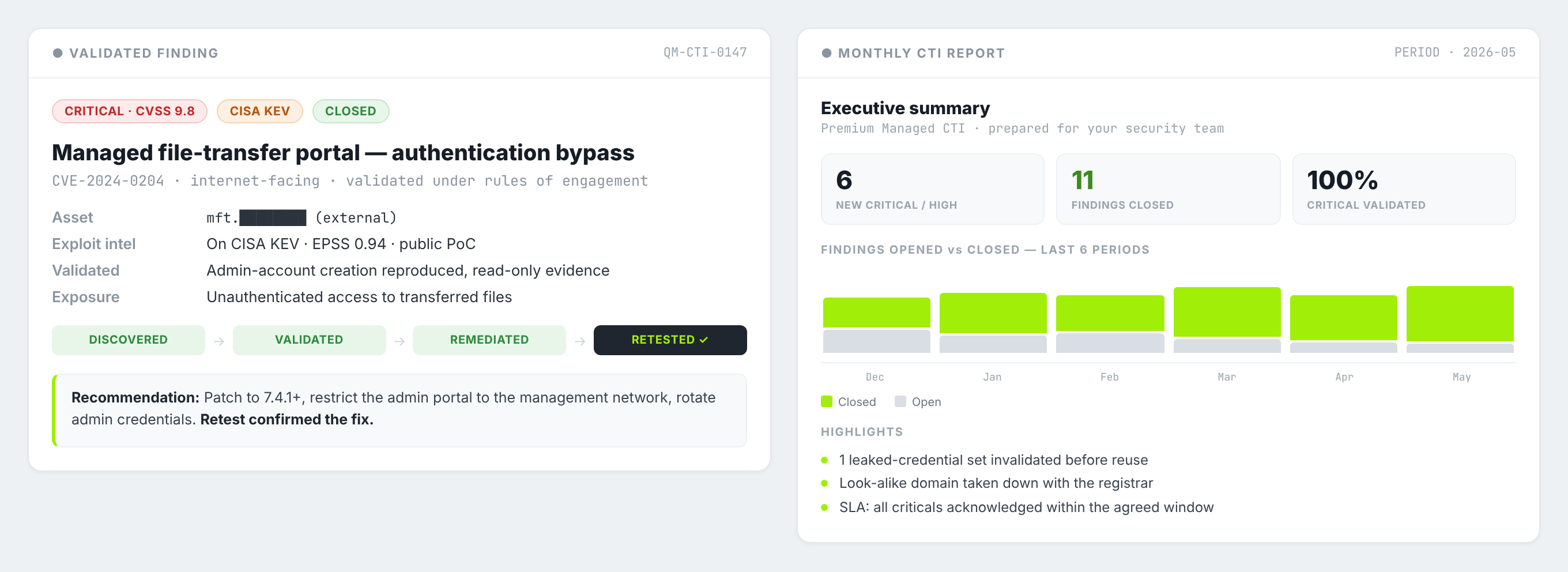
Illustrative finding and monthly report layout. Not an actual customer case.
Illustrative only: how a finding and the monthly report are laid out. Not an actual customer case.View original image (opens in a new tab)

ILLUSTRATIVE worked example. Not an actual customer case.

Validated intelligence can feed SIEM platforms and firewalls in formats such as STIX/TAXII, CSV, and JSON/REST. Integrations are scoped per environment and policy; a feed connection does not authorize automatic blocking.

  • Fortinet
  • Palo Alto
  • Check Point
  • QRadar
  • CrowdStrike NG-SIEM
  • STIX/TAXII
  • CSV
  • JSON/REST

Engagement

Who answers, and when.

  1. 01

    A named analyst

    One accountable person on your account.

  2. 02

    Agreed cadence

    Daily feed, weekly and monthly reporting as agreed.

  3. 03

    Response and escalation

    Acknowledgement and escalation commitments set out in your statement of work.

  4. 04

    Quarterly review

    Results and scope revisited every quarter.

Engagement and trust

Light onboarding. Data stays with you.

Premium works mostly from the outside in. You get a named analyst, an agreed reporting cadence and quarterly review, and commitments set out in the statement of work. No passwords are needed, and monitoring does not require SIEM or EDR access.

Aligned with INCD guidance, Bank of Israel Directive 361 where applicable, and Privacy Protection Law Amendment 13. Alignment is not certification.

External signals, indicators, and exposures are used for enrichment and reporting. Specific data-handling, processing, and minimization terms are set out in your DPA and scope of work.

Start with an Exposure & Vulnerability Snapshot

A scoped assessment of 2–3 weeks on your own environment, agreed in writing before any work begins.

Request a scoped assessment

The practical questions

Questions. Answered straight.

How is Premium CTI different from Advanced CTI?

It includes everything in Advanced CTI, then adds selected premium CTI vendors operated by QMasters and validated exposure with selected authorized penetration testing.

Does an IOC match mean we are compromised?

No. Malicious indicator traffic is a signal to investigate, not confirmed compromise. Likewise a version match is not proven exploitation.

What may be tested?

Only authorized targets, within agreed windows and under written rules of engagement. Testing is not unbounded.

Which vendors are used?

Examples include Cyberint, Kaspersky, and Fortinet. One vendor is included and extras are agreed in scope.

Do you need access to our SIEM or EDR, or our passwords?

No. Monitoring does not require SIEM or EDR access and no passwords are needed. Direct integrations are optional and scoped.

Are the example results guaranteed?

No. They are anonymized results from selected engagements. Your results depend on your environment and agreed scope.

Is this a compliance certification?

No. The service is aligned with INCD guidance, Directive 361 where applicable, and Amendment 13. Alignment is not certification.

Next step

Scope your snapshot.

Tell us which environment to cover. Do not include passwords, tokens, or sensitive evidence. This enquiry does not authorize scanning or testing.

COVERAGE ENQUIRY

Start a coverage discussion

Business contact details are enough to get started. Detailed technical scoping follows through an agreed channel.

Tool names only; no credentials or configuration details.

Keep this brief. Do not include passwords, access tokens, customer records, or incident evidence. This request does not authorize scanning or testing.

Your information is handled under our privacy policy. Privacy policy

Or email [email protected]