INCIDENT RESPONSE · 10 MIN
Prevention Is Not Eviction: Anatomy of a Reverse-Shell Alert
CrowdStrike raised a reverse-shell alert. QMasters MCSS stopped the process and escalated; the investigation found a second affected node and credential exposure.
Is an intrusion over when endpoint protection kills a reverse shell?
No. Killing a reverse-shell process stops one execution, but it does not prove the attacker has lost access, that other workloads are clean, or that exposed credentials have not been used. The SOC must investigate the original foothold, scope other systems, contain affected workloads, rotate exposed secrets and verify the impact against independent telemetry.
Prevention Is Not Eviction: Anatomy of a Reverse-Shell Alert
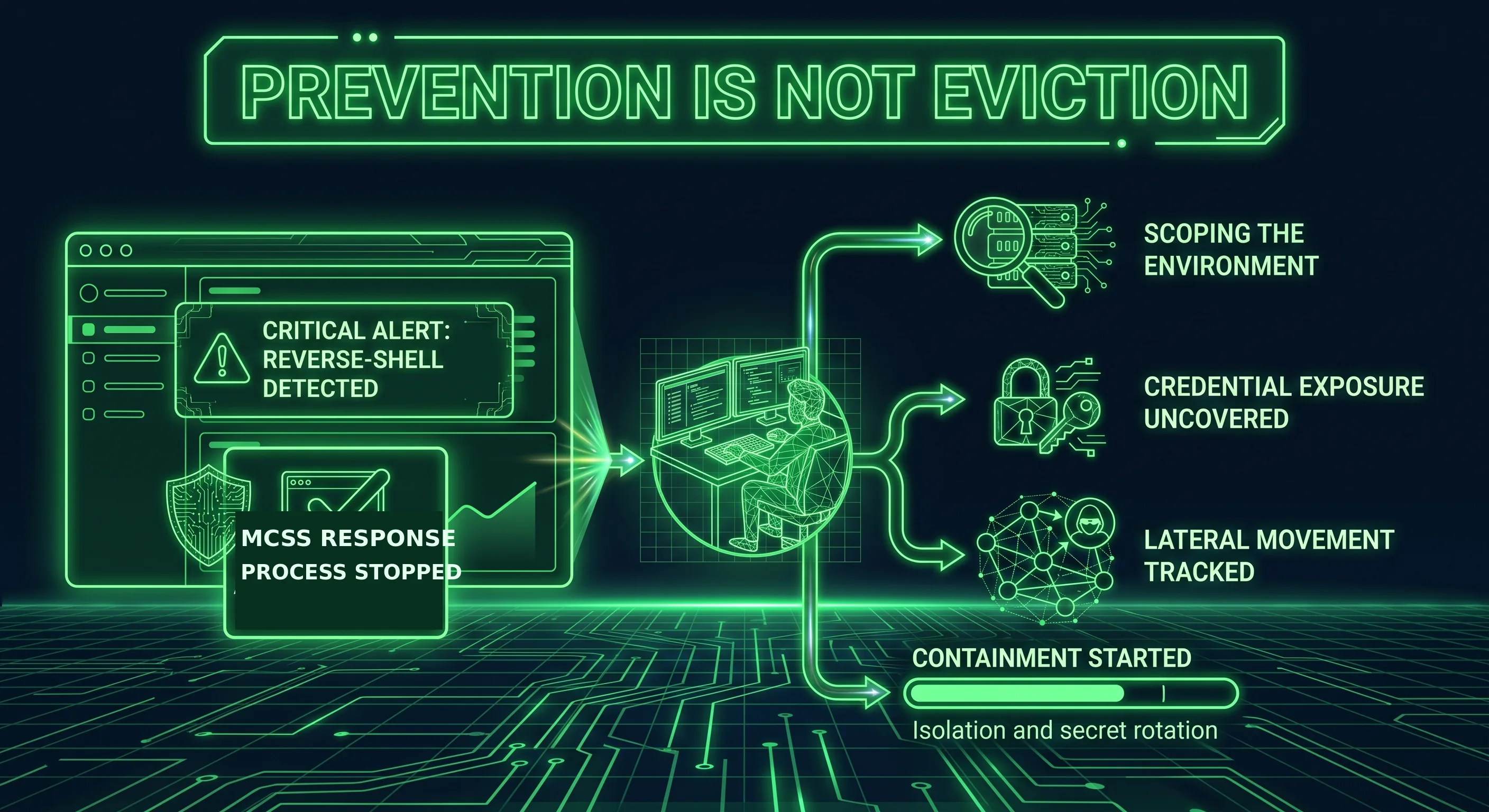
CrowdStrike raised a critical reverse-shell alert on an internet-facing workload in a customer's Kubernetes environment. QMasters MCSS responded, stopped the reverse-shell process and escalated the incident. The process was gone. The question was whether the operator was.
It would have been easy to close the ticket: process stopped, alert addressed, move on. Our SOC team kept going. That decision turned a closed-looking alert into an investigation of continued access, a second compromised node that had not alerted, and exposed credentials. Here is what happened next—and why a successful process stop is only the beginning of an incident response.
This account is anonymized. It contains no customer, host or network identifiers, calendar dates or incident-specific indicators.
A killed process is one dead process, not an evicted adversary
This is the distinction that decides how far a SOC gets: prevention is a control, not an outcome. Stopping the reverse shell ended that execution. It did nothing by itself about the flaw that allowed access, credentials already exposed or an operator who could reconnect.
The MCSS analysts ran the critical-alert playbook instead of treating the one-line detection as a complete story. They notified the customer, requested network containment of the affected node, opened a case and pulled the process tree and related activity from the SIEM.
Good instinct. The adversary was not done.
The adversary came back—on a different port
Shortly after the first process was stopped, access was re-established on the same host through a different port. One channel acted as a quiet beacon; another supported an interactive session. The operator continued working for roughly half an hour.
That is the practical meaning of "prevention is not eviction." The response to the initial process bought time. Closing the incident then would have left the subsequent activity outside the investigation.
One detection is a starting point—so sweep the estate
The CrowdStrike alert named one workload. The obvious trap was to scope the incident to the workload that alerted.
Our MCSS triage sweep covered other workloads running the same application and surfaced a second node affected by the same exploit. No matching behavioural alert had fired there. The operator had changed the sequence enough that the original single-command detection did not fire.
That absence matters. If we had trusted the alert to define the boundary of the incident, the second node would not have been identified by that detection. Finding the affected system that didn't alert is part of what separates a SOC investigation from an alert queue.
What the adversary was actually after
With a root shell in the container, the operator moved from access to objectives. At a defender's level of detail, the investigation found:
- Reconnaissance of the container and its position on the network.
- Application secrets: cryptographic material and configuration carrying downstream credentials.
- The workload's Kubernetes identity token: read from the container and used to enumerate what its permissions could reach through the cluster API.
- Credential hunting on neighbouring services: diagnostic interfaces exposed memory dumps that the operator searched for cloud access keys.
- A probe of the node's cloud-metadata endpoint: an attempt to reach the node's cloud identity.
One application flaw had crossed multiple boundaries: the application's secrets, cluster identity, neighbouring services and a potential path to the cloud control plane. That cascade—not the initial shell—is the real lesson. A weakness in one internet-facing workload is rarely confined to that workload.
The question that matters: did it reach the cloud?
When credentials are exposed, rotation is necessary. Leadership's next question is sharper: were any of them used? That answer needs evidence, not reassurance. The team correlated endpoint and cluster activity with the cloud audit trail.
The trail was complete and current for the investigated window. In that window, the team found no observed cloud API use of the exposed credentials attributable to the operator. The evidence narrowed the observed impact to the container and cluster layer; it did not make the credential exposure harmless or remove the need to rotate secrets.
Without those cloud records, the honest status would have been "credentials exposed, cloud impact unknown." The difference between we think it is contained and we can show what the logs contain is a data-integration decision made long before an incident.
What we got wrong, on the record
A case study that only lists wins is an advertisement. Two things did not go the way they should have:
- The initial alert auto-resolved while the operator was still active. Its timer reflected the first process being stopped, not the status of the wider incident. An alert's resolved state must not close an active investigation.
- Containment confirmation for the second node lagged behind its discovery. Identifying another affected workload is not the same as verifying that it has been isolated. That confirmation has to be explicit for every affected node.
We report these misses because they change the operational lesson. A SOC that never reports a miss is not necessarily clean; it may simply not be looking.
What we changed
Detection. We added behavioural detections aimed at the pattern rather than one command string, validating them in monitor mode before enforcement:
- an application runtime spawning a shell or utility that has no reason to be its child;
- reverse-shell behaviour across separate processes, regardless of the parent that generated the first alert;
- a utility contacting the cloud-metadata endpoint;
- requests to exposed diagnostic or memory-dump interfaces;
- workload identity tokens read or reused outside the application process.
Single-signature rules lose to an operator who can change technique. Behaviour-based rules force that operator to work harder.
Hardening (the customer-side asks). Detections treat the symptom; these recommendations remove conditions that made the intrusion useful:
- do not run application containers as root;
- close or authenticate diagnostic and memory-dump endpoints;
- issue short-lived, tightly scoped workload identity tokens;
- restrict unnecessary outbound connections from pods;
- require MFA for privileged cloud administrative actions.
The detections, concretely — Falcon Custom IOA + NG-SIEM CQL
Everything below is behavioural and indicator-free: no incident C2 address, file hashes or customer identifiers. Block an incident's atomic indicators separately; these patterns target the techniques that persisted when the operator changed their sequence.
Before enforcing anything: these patterns and queries were not executed against a live tenant for this article. Check field availability and syntax in your own environment, start each detection in Monitor/Detect, tune allowlists and false positives, and only then consider Block. Do not treat the examples as production-validated rules.
Falcon Custom IOA — prevention on the endpoint
Build under Endpoint Security → Custom IOA rule groups, Platform = Linux, Rule Type = Process Creation. The regex engine is RE2: no look-ahead/look-behind or back-references; field-length limits and supported matching options must be checked in your tenant. Set the action per rule.
Rule 1 — Application runtime spawns a shell · T1190 / T1059.004 · Block
- Parent Image Filename:
./(dotnet|java|node|python[0-9.]|php-fpm[0-9.]*|ruby|nginx|httpd) - Image Filename:
.*/(sh|bash|dash|nc|ncat|socat) - Command Line:
(nc\s|ncat\s|/dev/tcp/|mkfifo|-e\s*/bin/(ba)?sh)
Rule 2 — Reverse-shell FIFO primitive, any parent · T1059.004 · Block — catches the split-process variant that had no application parent
- Command Line:
(mkfifo\s+\S+./bin/(ba)?sh|cat\s+/\S+.(nc|ncat)\s+[0-9]|/dev/tcp/[0-9])
Rule 3 — Unauthenticated diagnostic / heap-dump pull · T1046 / T1552 · Detect
- Image Filename:
.*/(wget|curl) - Command Line:
/actuator/(heapdump|env|threaddump|configprops)
Rule 4 — Cloud-credential hunting in files · T1552.001 · Detect
- Command Line:
(grep\s+.AKIA[A-Z0-9]|grep\s+.(aws_secret|aws_access|AWS_SESSION)|strings\s+\S*(heap|core|dump))
Rule 5 — Workload identity token read or reused by a shell · T1528 / T1552.007 · Detect
- Image Filename:
.*/(sh|bash|dash|cat|curl|wget) - Command Line:
(/run/secrets/kubernetes.io/serviceaccount/token|Authorization:\s*Bearer\s+ey)
NG-SIEM CQL — hunting and correlation
Use Next-Gen SIEM → Advanced Event Search to test these queries; save appropriate ones as scheduled correlation rules after validation. The examples use Falcon event fields including ProcessRollup2 and NetworkConnectIP4.
Query A — Application runtime spawns a shell
#event_simpleName=ProcessRollup2 event_platform=Lin
| ParentBaseFileName=/^(dotnet|java|node|python[0-9.]*|php-fpm.*|ruby|nginx|httpd)$/i
| ImageFileName=/\/(sh|bash|dash|nc|ncat|socat)$/i
| table([@timestamp, aid, ComputerName, ParentBaseFileName, ImageFileName, CommandLine, UserName])
Query B — Reverse-shell primitive, any parent
#event_simpleName=ProcessRollup2 event_platform=Lin
| CommandLine=/mkfifo|\/dev\/tcp\/|(nc|ncat)\s+\d{1,3}(\.\d{1,3}){3}\s+\d+/i
| table([@timestamp, aid, ComputerName, ParentBaseFileName, CommandLine])
Query C — External connection on a non-web port (the port logic the IOA cannot express)
#event_simpleName=NetworkConnectIP4 event_platform=Lin
| RemotePort!=80 RemotePort!=443 RemotePort!=53
| RemoteAddressIP4!=/^(10\.|172\.(1[6-9]|2\d|3[01])\.|192\.168\.|127\.|169\.254\.)/
| groupBy([aid, ComputerName, RemoteAddressIP4, RemotePort], function=count())
Query D — Same technique across ≥ 2 hosts (estate-wide campaign)
#event_simpleName=ProcessRollup2 event_platform=Lin
| CommandLine=/mkfifo|\/dev\/tcp\/|(nc|ncat)\s/i
| groupBy([CommandLine], function=[count(aid, distinct=true, as=hosts), collect([ComputerName])])
| hosts>=2
Query E — Metadata/IMDS access by a shell or utility
#event_simpleName=ProcessRollup2 event_platform=Lin
| CommandLine=/169\.254\.169\.254|\/latest\/meta-data/i
| table([@timestamp, aid, ComputerName, ImageFileName, CommandLine])
Two rules worth building by hand
These span more than one event stream, so build them in the correlation engine rather than a single query:
- Re-establishment after prevention — prevention is not eviction. A reverse-shell detection on a host, followed by a fresh outbound session from that same host to the same external peer within roughly 15 minutes. Escalate and do not let the original detection auto-resolve.
- Prevention without containment — the response-gap trap. A process-stop event with no matching host-containment action inside the SLA window. This would have flagged the alert that auto-resolved while the operator was still active.
Five takeaways for security leaders
- Prevention is a control, not an outcome. A killed process is a data point. Measure eviction and verified containment, not just detections.
- One alert does not define the scope. Sweep related workloads for the same technique; the node that didn't alert may be the one that matters.
- Correlate endpoint, cloud and cluster telemetry. You cannot establish the observed blast radius after credential exposure from one data source.
- Behavioural detection beats a single signature when an operator changes the sequence but not the objective.
- Report your misses. The auto-resolved alert and delayed containment confirmation belong in the account, not just the successes.
Whether the operator is a criminal or part of an authorized test, the SOC's job when that initial alert arrives is the same: treat it as real, investigate the full scope and prove what the evidence can—and cannot—show. The alert that looks closed deserves a second look.
That is how QMasters MCSS and our incident response team approach a prevention alert: as the start of the work, not the end. Explore our incident response playbook, or contact our SOC to pressure-test your own response.
FAQ
Frequently asked questions.
No. A prevention event describes one blocked process, not the state of the whole intrusion. Investigate re-entry, additional hosts and credential exposure before closing the case.
Correlate endpoint, application, Kubernetes and cloud audit telemetry, and sweep related workloads even when they did not trigger the original detection.
Check complete, current cloud audit logs for the relevant incident window, corroborate against endpoint and cluster activity, and rotate exposed credentials regardless of observed use.
ABOUT THE AUTHOR
Practitioners from the QMasters Security Operations Center. We run 24/7 monitoring, detection engineering, and incident response for organisations across regulated industries — and write here from the offense and defense work in front of us.